How to Use Shopee Seller Centre Traffic Reports to Identify Which Listings Are Wasting Your Ad Spend

If you are running paid ads on Shopee and your overall ROAS looks acceptable at a glance, you may still be losing money on individual listings without realising it. Shopee Seller Centre provides traffic and performance data that most sellers either ignore or misread. Used correctly, that data can show you exactly which product listings are consuming ad budget without converting, which ones are quietly profitable, and where you should be shifting spend to improve overall contribution margin across your Shopee channel.
This article walks through a practical process for reading Shopee Seller Centre traffic and product reports, matching that data to your cost structure, and making decisions that actually improve profitability — not just click volume.
Why Traffic Reports Are More Useful Than Your Campaign Dashboard
Most sellers start and end their Shopee ad analysis looking at aggregate figures in the Shopee Ads dashboard. That dashboard provides headline metrics across spend, clicks, and attributed revenue. The problem is that when sellers rely only on blended numbers or multi-product campaigns (such as Ad Groups under GMV Max), a headline ROAS of 4.2x could easily mask three listings with a ROAS of 0.8x dragging down six listings that are genuinely performing at 7x or 8x.
Inside Seller Centre, the ‘Product Performance’ and ‘Traffic Sources’ reports under the ‘Business Insights’ section break store and listing performance down by SKU. They show page views, visitors, bounce rates, and conversion data tied to individual product pages. When you combine this with your listing-level Shopee Ads data (impressions, clicks, CTR, and CPC) and your own gross margin figures, you get a complete picture of profitability by SKU — which is the only level of analysis that actually lets you make useful decisions.
The Four Metrics That Matter at Listing Level
Before pulling your reports, it helps to be clear about which numbers you are looking for and why each one matters.
| Metric | Where to Find It | Why It Matters |
|---|---|---|
| Impressions | Shopee Ads Dashboard / Traffic Sources | Shows whether your listing is being surfaced by ads or organic search |
| Click-Through Rate (CTR) | Shopee Ads Dashboard | Low CTR on high-spend listings signals weak creative or pricing vs competitors |
| Listing Conversion Rate | Business Insights (Product Performance) / Ads Report | Reveals whether traffic is converting once buyers reach the page |
| Ad Spend per Unit Sold | Calculated from Ads dashboard | The real cost of acquiring each sale — compare this to your gross profit per unit |
The last metric — ad spend per unit sold — is the one most sellers never calculate at the listing level. It is straightforward to compute and immediately actionable.
Step-by-Step: Pulling and Structuring Your Listing Data
- Log into Shopee Seller Centre and navigate to ‘Business Insights’, then open ‘Product’ > ‘Product Performance’ (or ‘Traffic Sources’ depending on your market).
- Set your date range to the last 30 days. Avoid shorter windows as daily data has too much variance to draw conclusions.
- Export the listing-level performance report as an Excel or CSV file. This gives you page views, visitors, and conversion metrics per product.
- Open your Shopee Ads dashboard separately and export the product-level ad performance report for the same 30-day period to capture impressions, clicks, CTR, ad spend, and ad-attributed units sold.
- In a spreadsheet, join both datasets on the listing ID or product name. Add columns for: total ad spend, units sold from ads, ad spend per unit sold, and your gross profit per unit.
- Sort by total ad spend descending so your highest-spend listings appear at the top — these are where budget decisions have the most impact.
A useful rule of thumb: if your ad spend per unit sold exceeds 60–70% of your gross profit per unit on a given listing, that listing is almost certainly unprofitable after ad costs are included. Flag any listing where this threshold is crossed and treat it as a priority review.
A Realistic Example: Three Listings, Three Very Different Outcomes
Consider a seller running a Shopee store selling home organisation products. They have three listings receiving significant ad spend over the past month. At first glance, all three appear to be ‘working’ because total attributed revenue from the campaign exceeds total ad spend. But at the listing level, the picture changes.
| Listing | Ad Spend (SGD) | Units Sold via Ads | Ad Spend / Unit | Gross Profit / Unit | Net Margin After Ads |
|---|---|---|---|---|---|
| Storage Rack (3-tier) | 180 | 45 | 4.00 | 12.50 | +8.50 |
| Cable Organiser Box | 220 | 18 | 12.22 | 9.80 | -2.42 |
| Drawer Divider Set | 95 | 38 | 2.50 | 7.20 | +4.70 |
The Cable Organiser Box is destroying margin. It is spending SGD 12.22 in ads for every unit sold, but only generating SGD 9.80 in gross profit. Every sale costs SGD 2.42 in net terms. Meanwhile the campaign as a whole might show a blended ROAS of 3.5x because the other two listings are pulling the average up. Without listing-level analysis, the seller would never know to pause or restructure ads on the Cable Organiser Box.
A blended ROAS figure across multiple listings can easily hide individual listings that are loss-making. Never use campaign-level ROAS alone to judge whether a product’s ads are profitable. Always calculate ad spend per unit sold relative to gross profit per unit for each SKU.
Diagnosing Why a Listing Is Underperforming
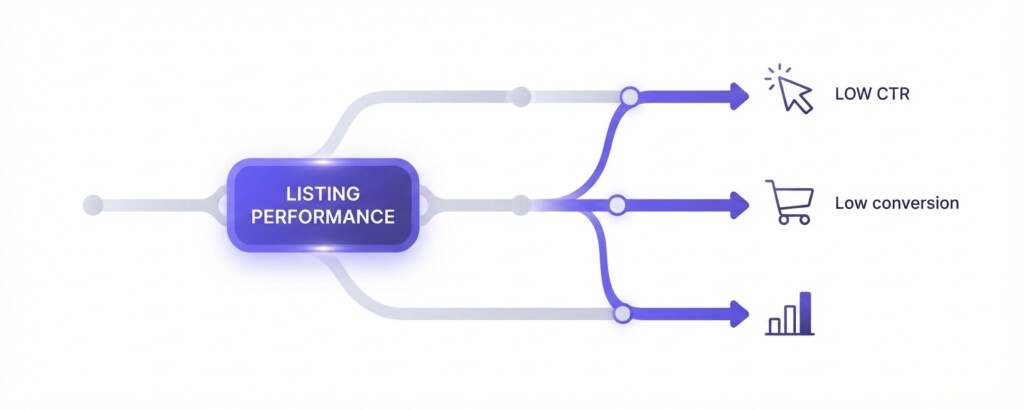
Once you have identified listings with poor ad economics, the traffic data tells you where the problem sits. There are three common failure patterns.
The first is a low CTR problem. The listing is getting impressions from your ads but buyers are not clicking. This typically means your main image is weak relative to competitors, your price is uncompetitive at the search results level, or your title is not matching buyer intent. In this case, the fix is creative and positioning, not bid reduction.
The second is a low conversion rate problem. Buyers are clicking but not purchasing. This means the listing page itself is not convincing enough — the images may not show product details well, the description may not address common objections, reviews may be thin, or the price may look high relative to what buyers expected. Here, the fix is listing quality improvement before increasing ad spend.
The third is a margin problem, not a traffic problem. The listing converts reasonably well but your cost of goods or fulfilment costs make it impossible to run ads profitably at any reasonable CPC. This is a product economics problem. The answer may be to pause ads entirely and let the listing earn organic traffic only, or to reprice the product if the market allows it.
Building a Simple Listing Profitability Calculation
For each listing you are running ads on, build a simple per-unit contribution calculation. This takes about two minutes per SKU and makes every ad decision far more grounded.
| Selling Price (after Shopee discounts) | SGD 28.90 |
| Less: Shopee Commission (approx. 3–5%) | – SGD 1.16 |
| Less: Shopee Transaction Fee | – SGD 0.58 |
| Less: Cost of Goods Sold | – SGD 9.40 |
| Less: Fulfilment / Shipping Cost | – SGD 2.80 |
| Gross Profit per Unit | SGD 14.96 |
| Less: Allocated Ad Spend per Unit Sold | – SGD 4.20 |
| Contribution Margin per Unit After Ads | SGD 10.76 |
Run this for every listing with meaningful ad spend. Where contribution margin after ads turns negative, you have a confirmed problem. Where it is thin but positive, you can make a considered decision about whether volume justifies the margin compression.
How This Compares Across Your Multi-Channel Operation
If you are selling the same products across Shopee, Lazada, TikTok Shop, and your Shopify store, the per-unit contribution calculation becomes even more powerful. Each channel has a different fee structure, different ad cost dynamics, and different organic discovery rates. A product that is marginally unprofitable to advertise on Shopee might be your strongest performer on Shopify where you have no platform commission and your own email audience drives repeat purchases without ad spend.
This is where centralised multi-channel analytics tools become genuinely useful. BrizoMarket, for example, is designed to pull sales and cost data across Shopee, Lazada, TikTok Shop, and Shopify into a single view so you can compare contribution margin by product and by channel without manually reconciling multiple exports. If you are managing more than two channels and more than fifty active SKUs, that kind of consolidation stops being a convenience and starts being a necessity.
Practical Actions After Your Traffic Report Analysis
- Pause or significantly reduce bids on any listing where ad spend per unit sold exceeds gross profit per unit. Do not wait to see if it improves — every sale is costing you money.
- For listings with low CTR but strong gross margins, invest in improving the main image and title before restoring bids. The margin supports profitability if you can fix the click problem.
- For listings with good CTR but low conversion, audit the listing page. Check competitor pages, review your images, description, and pricing relative to what buyers see after clicking.
- For high-performing listings — strong ROAS, good contribution margin — review whether your daily budget caps are limiting their reach. These listings deserve more spend, not less.
- Build a monthly review cadence. Shopee listing performance shifts with seasonality, competitor behaviour, and platform algorithm changes. A snapshot from one month may not hold three months later.
- Document your findings in a simple tracker. Over time, this becomes a performance history that helps you make faster, better decisions about which products to promote and at what intensity.
The Takeaway
Shopee Seller Centre Traffic and Business Insights reports are not just a curiosity — they are the starting point for genuine listing-level profitability analysis. The sellers who treat their Shopee ad spend as a single budget line and judge success by blended ROAS are almost certainly subsidising their worst-performing listings with the returns from their best ones. Separating that data, calculating contribution margin per listing, and acting on what the numbers show is the practical difference between an ad account that slowly drains margin and one that genuinely supports business growth.
The analysis described in this article can be done in a spreadsheet for a small catalogue. As your product range and channel mix grows, consider whether a consolidated analytics solution gives you the same insight faster and with less manual work.
Struggling to See Which Listings Are Actually Profitable Across Channels?
BrizoMarket helps e-commerce operators analyse product and channel performance across Shopee, Lazada, TikTok Shop and Shopify — so you can see contribution margin by SKU without manual spreadsheet reconciliation.