How to Use Shopify Product Reports to Find Which Variants Are Dragging Down Your Overall Catalogue Margin
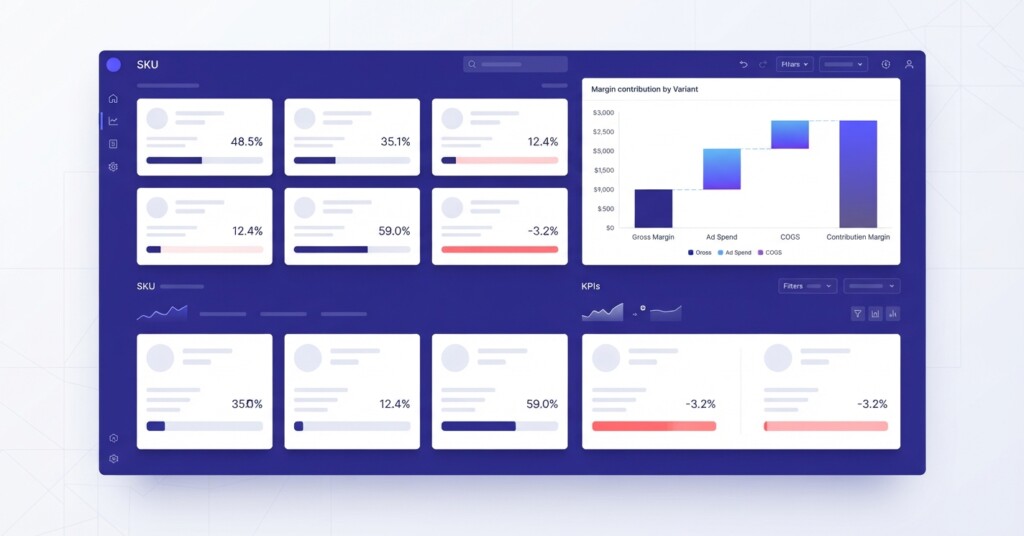
If your Shopify store looks profitable at the top line but margins feel tighter than they should, the culprit is often hiding inside your variant-level data. A single product listing can contain ten or twenty variants — different sizes, colours, or bundles — and a handful of those variants can quietly erode the gross profit generated by everything else. Shopify’s product reports give you the data to find them. The challenge is knowing exactly where to look and what to do once you find the problem.
Why Variant-Level Margin Analysis Matters More Than Product-Level Revenue
Most Shopify merchants review performance at the product level: total units sold, total revenue, maybe average order value. That view is useful for understanding demand, but it tells you almost nothing about profitability. Two variants within the same product can have wildly different contribution margins depending on their cost of goods, the promotions applied to them, and how they are sold across your channels.
Consider a skincare brand selling a moisturiser in three sizes: 30ml, 75ml, and 150ml. The 75ml might be the bestseller by units but sold predominantly through a TikTok Shop affiliate campaign with a 15% commission. The 150ml might have a higher price but a lower percentage margin because of heavier packaging costs. And the 30ml might actually deliver the best margin per unit but barely sells because it receives no promotional support. Without breaking performance down to the variant level, you are optimising based on incomplete information.

Where to Find Variant Data Inside Shopify Reports
Shopify’s built-in analytics are available under Analytics > Reports. The most relevant reports for this analysis are:
- Sales by Product Variant SKU — shows units sold, gross sales, discounts, returns, and net sales at the variant level
- Sales by Product — useful for grouping variants back to their parent product after you have identified outliers
- Month-End Inventory Snapshot — shows variant-level inventory counts to help you correlate slow-moving variants with margin pressure from carrying costs
- ABC Analysis by Product — available on the standard Shopify plan and higher; it segments products into A, B, and C grades by revenue contribution at the product level
The critical limitation of Shopify’s native reports is that they do not automatically display cost of goods sold (COGS) per variant in the standard analytics view. You need to have cost-per-item set on each variant inside the product editor for Shopify to calculate profit in the Finances summary reports. If those cost fields are empty or inaccurate, the margin data in your reports is unreliable.
Before running any variant margin analysis, audit your Shopify product editor to confirm that every active variant has a cost-per-item entered. Even a single missing cost entry can distort your entire catalogue margin calculation.
Building a Variant Margin Analysis: Step by Step
The following process works whether you are analysing a focused catalogue of fifty SKUs or a large store with several hundred variants. The logic is the same; only the volume of data changes.
Step 1: Export the Sales by Product Variant SKU report for your chosen period — typically the last 90 days gives a meaningful sample without being distorted by seasonal spikes. Export as CSV.
Step 2: Add a COGS column. Pull your cost-per-item from the Shopify product export (Products > Export) and use the variant SKU as the join key in a spreadsheet. If you use a third-party inventory tool such as Cin7, Unleashed, or similar, your COGS data will likely be more accurate there.
Step 3: Calculate gross profit per variant using the formula: Gross Profit = Net Sales − (Units Sold × Cost Per Item). Then calculate Gross Margin % = (Gross Profit ÷ Net Sales) × 100.
| Net Sales (variant: 75ml moisturiser, 90 days) | $4,200 |
| Units Sold | 210 units |
| Cost Per Item | $8.50 |
| Total COGS | $1,785 |
| Gross Profit | $2,415 |
| Gross Margin % | 57.5% |
Step 4: Sort all variants by Gross Margin % ascending. The lowest-margin variants sit at the top of the list. Flag any variant below your target gross margin threshold — most product-focused e-commerce businesses target 40–60% gross margin, though this varies significantly by category.
Step 5: Cross-reference low-margin variants with their unit volume. A variant with a 28% margin that sells 500 units per month is a much more urgent problem than one selling 10 units. The combination of low margin and high volume is where catalogue drag is most severe.
Common Reasons Variants Underperform on Margin
Once you have identified the underperforming variants, the next step is diagnosing why. There are typically four root causes:
| Root Cause | Typical Symptom | Diagnostic Check |
|---|---|---|
| Cost of goods too high for the price point | Margin below 30% despite reasonable retail price | Compare cost vs. competitor retail pricing; review supplier terms |
| Excessive discounting on specific variants | High discount column in Shopify variant report | Check promotion history; filter by discount code usage |
| Channel commission eroding contribution margin | Margin looks fine in Shopify but poor when channel fees added | Add platform fee layer to your margin calculation |
| Returns concentrated on specific variants | High return rate deflating net sales | Cross-reference with Shopify returns data by variant SKU |
Channel commission is particularly important for multi-channel operators. A variant might show a 52% gross margin inside Shopify, but if it is primarily sold through Shopee or Lazada where platform fees, fulfilment fees, and promotional subsidy requirements apply, the true contribution margin after channel costs could be 20–25%. That is a fundamentally different business outcome.
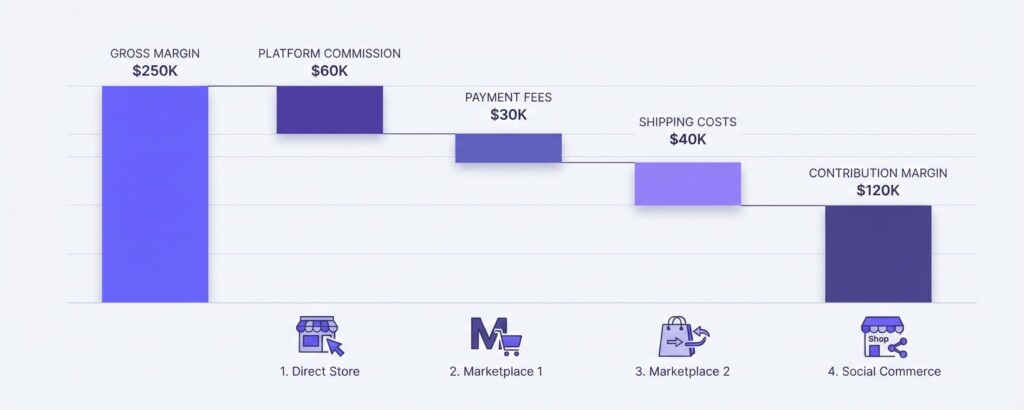
Calculating True Contribution Margin Across Channels
Gross margin only accounts for COGS. Contribution margin goes further and deducts the variable costs directly associated with generating a sale: platform commissions, payment processing fees, shipping costs, and any channel-specific advertising spend. For variants sold across Shopify, Shopee, Lazada, and TikTok Shop, these costs differ meaningfully by channel.
| Channel | Typical Commission Range | Payment Fee | Avg. Shipping Contribution | Contribution Margin Impact |
|---|---|---|---|---|
| Shopify (direct) | 0% | 1.5–2.9% | Varies by carrier | Lowest deductions overall |
| Shopee | 4–12%+ (varies by category/tier) | 2.0–3.3% transaction fee | Often seller-subsidised | Moderate to high deduction |
| Lazada | 4–10%+ (varies by category/tier) | 2.0–3.3% payment fee | FBL or 3PL costs apply | High deduction for large/heavy items |
| TikTok Shop | 4–8%+ (plus creator affiliate %) | 2.0–3.3% transaction fee (market dependent) | Seller-managed or platform-subsidised | Variable; affiliate % adds materially |
When you layer these channel costs on top of your Shopify variant COGS data, you often find that the same variant has a contribution margin of 45% on your direct Shopify store but only 18% on Lazada, particularly if the product is heavy or bulky and uses Lazada’s fulfilled logistics. That 18% may not be worth the inventory allocation, pick-and-pack complexity, and customer service overhead it generates.
Do not make channel strategy decisions using Shopify gross margin data alone. A variant that appears profitable inside Shopify can be actively loss-making when sold through a high-commission marketplace channel. Always calculate contribution margin per variant per channel before drawing conclusions.
What to Do With Underperforming Variants
After identifying which variants are dragging down your catalogue margin, you have several practical options. The right choice depends on the root cause and the variant’s strategic importance.
- Reprice upward — if demand is inelastic and the variant has no close substitutes, a 10–15% price increase may recover margin without significantly affecting volume
- Renegotiate COGS — if the variant sells in reasonable volume, use the data to approach your supplier for better unit economics or minimum order quantity adjustments
- Restrict channel availability — continue selling the variant on your direct Shopify store where margin is healthiest, and delist it from high-commission channels where contribution turns negative
- Bundle with high-margin variants — pairing a low-margin variant with a high-margin accessory or consumable can improve blended margin per order
- Discontinue — if the variant has poor margin, low volume, and no strategic value (such as range completion), clearing stock and removing it frees capital for better performers
- Improve packaging or fulfilment efficiency — for variants where shipping cost is the margin killer, a packaging redesign or carrier review can materially improve the numbers
Using BrizoMarket to Automate the Cross-Channel View
The analysis described above is entirely achievable in a spreadsheet, but it is time-consuming to rebuild every month and prone to error when data from multiple channels needs to be combined. For operators running Shopify alongside Shopee, Lazada, and TikTok Shop simultaneously, a dedicated analytics layer that unifies variant-level sales, cost, and channel fee data saves significant time and surfaces margin issues faster.
BrizoMarket is built for this use case — connecting your e-commerce channels and presenting variant-level contribution margin in a single view, with channel costs already factored in. Rather than exporting CSVs from four platforms and joining them manually, you can see which variants are underperforming and on which specific channels within a single dashboard. For finance managers responsible for reporting across a multi-channel operation, that kind of consolidated view makes catalogue margin reviews substantially more actionable.
Making This a Regular Business Process
Variant margin analysis should not be a one-off exercise. Costs change as supplier prices shift. Channel fees are adjusted by platforms periodically. Promotional activity affects effective selling prices. A variant that had acceptable margins six months ago may have drifted into loss-making territory without anyone noticing.
A practical cadence for most Shopify-based businesses is a full variant margin review quarterly, with a lighter monthly check on any variants flagged as marginal from the previous review. If you run frequent promotional campaigns, layer in a post-campaign review to measure whether discounting eroded margin beyond acceptable thresholds on specific variants.
Set a gross margin floor threshold — for example, 35% gross margin and 20% contribution margin — for every variant in your catalogue. Any variant that falls below these thresholds for two consecutive review periods should trigger a formal pricing or sourcing review, not just be left on the shelf.
Key Takeaway
Your overall catalogue margin is the average of every variant you sell, weighted by volume. A handful of high-volume, low-margin variants can suppress that average significantly, masking the true profitability of your best performers. Shopify’s product reports, combined with cost-per-item data and channel fee overlays, give you everything you need to find these variants and make deliberate decisions about whether to reprice, restrict, bundle, or discontinue them. The merchants who do this work consistently are the ones who find margin improvement without needing to grow revenue first.
See Your Variant Margins Across Every Channel in One Place
BrizoMarket connects your Shopify store with your marketplace channels to give you variant-level margin visibility without the manual spreadsheet work. Understand exactly which SKUs are profitable, on which channels, and what to do about it.