How to Use Shopify Behaviour Reports to Identify Which Search Queries on Your Store Return Zero Results and Cost You Revenue
Every time a customer types a search query into your Shopify store and receives zero results, you lose a sale. Not because the product does not exist in your catalogue, but because the words your customer used did not match the words you used to describe it. This is a quietly expensive problem that most store operators never measure, and therefore never fix.
Shopify’s built-in Behaviour Reports give you the data to find exactly where this is happening. This article walks you through how to read that data, translate it into revenue impact, and act on it systematically.
Why Zero-Result Searches Matter to Profitability
A visitor who uses your store’s internal search is signalling high purchase intent. Research consistently shows that search users convert at a meaningfully higher rate than general browsers. When those high-intent visitors hit a dead end, they do not simply try a different search term — many of them leave.
Consider a store selling skincare products. A customer searches for ‘face wash for oily skin’ but the merchant has tagged the product as ‘foaming cleanser — oil control.’ The search returns nothing. The customer bounces. The sale is lost. The merchant paid for the traffic, the customer was ready to buy, and the only barrier was a terminology mismatch.
Zero-result searches are not a technical problem — they are a language gap between how your customers describe products and how your catalogue is structured. Fixing them is a commercial decision with a measurable revenue return.
Where to Find the Search Query Report in Shopify
Shopify’s Behaviour Reports sit inside the Analytics section of your admin. Navigate to Analytics → Reports → Behaviour. The two most important reports here are ‘Searches by search query’ (often labelled ‘Top online store searches’) and ‘Searches with no results.’
- Log in to your Shopify admin and go to Analytics → Reports.
- Click the ‘Behaviour’ category from the left-hand report list.
- Open ‘Searches with no results’ to see every search term that returned an empty page.
- Open ‘Searches by search query’ (or ‘Top online store searches’) to compare overall search volume against those empty results.
- Set your date range to at least the last 90 days to capture meaningful patterns.
- Export the data to CSV for deeper analysis in a spreadsheet.
Shopify’s Behaviour Reports are accessible across standard plans, though creating and saving custom reports and advanced report filtering are restricted to the Advanced Shopify and Plus plans. Core search metrics and zero-result search data are available on standard tiers.

How to Read the Data and Prioritise Action
The report shows you each search query, the number of times it was searched, and whether it returned results. Your job is to categorise each zero-result query into one of three buckets.
| Category | What It Means | Action Required |
|---|---|---|
| Product exists, wrong language | You stock the item but the name or tags don’t match | Add synonyms, update tags, or add search redirects |
| Product does not exist | Customers want something you don’t sell | Evaluate as a ranging or sourcing opportunity |
| Misspelling or typo | Common misspellings of real product names | Add synonym rules in Shopify Search & Discovery or rely on built-in typo tolerance |
Start with Category 1 — products you already stock but customers cannot find. This generates immediate revenue recovery with zero additional cost. Category 2 is a medium-term ranging decision. Category 3 is a quick technical fix.
Calculating the Revenue Cost of Zero-Result Searches
Before presenting this to your team or investors, translate the problem into dollars. Here is a straightforward framework using realistic assumptions for a mid-sized Shopify store.
| Total zero-result searches per month | 1,200 |
| Estimated conversion rate of search users (industry typical range: 3–8%) | 5% |
| Potential lost transactions per month | 60 |
| Average order value | $85 |
| Estimated monthly lost revenue | $5,100 |
| Estimated annual lost revenue | $61,200 |
Even if only 30% of those zero-result searches represent recoverable revenue — where the product exists but was not found — that is still over $18,000 per year from one single data quality problem. For multi-channel operators running across Shopify, Shopee and Lazada simultaneously, this problem is compounded across every storefront.
Do not assume all zero-result searches are recoverable. Some represent demand for products you should not stock, or search patterns from non-buying users. Apply a conservative recovery assumption (20–40%) when building your business case. Overstating the opportunity will undermine your credibility when presenting to finance.
Five Practical Fixes You Can Implement This Week
Once you have your prioritised list, the following fixes address the majority of zero-result problems without requiring developer resources.
- Add synonyms to product tags: If customers search ‘moisturiser’ but your product is tagged ‘hydrating cream,’ add both terms as tags on the product page.
- Use Shopify’s Search & Discovery app to create synonym rules: This free app lets you map customer language to your catalogue language without changing your product names.
- Set up search redirects for high-volume zero-result terms: Send specific queries directly to a relevant collection or product page instead of a results page.
- Update product titles to reflect common customer language: If ‘wireless earbuds’ is a top zero-result query and you sell them as ‘Bluetooth audio pods,’ the title is working against you.
- Review your product description and tag content: Shopify storefront search crawls product titles, descriptions, and tags (note that metafields are not indexed by default search), so including natural-language descriptions of use cases dramatically improves match rates.
Connecting Search Performance to Gross Margin and Contribution Margin
Recovering lost search revenue is valuable, but not all recoverable revenue is equally profitable. When you identify a high-volume zero-result query and the matched product has a low gross margin, the revenue uplift may not justify a prioritisation push.
Here is a practical example. A Shopify store selling electronics accessories identifies three high-volume zero-result categories after reviewing 90 days of Behaviour Report data.
| Zero-Result Query | Monthly Searches | Matched Product | Avg Selling Price | COGS | Gross Margin % | Est. Monthly Revenue Recovery | Est. Monthly Gross Profit Recovery |
|---|---|---|---|---|---|---|---|
| USB-C hub | 420 | 4-port USB-C dock | $49 | $22 | 55% | $1,029 | $566 |
| cheap phone case | 380 | Budget TPU case | $9 | $6 | 33% | $171 | $56 |
| laptop stand adjustable | 210 | Aluminium desk riser | $79 | $31 | 61% | $829 | $506 |
The ‘cheap phone case’ query has significant volume but low gross margin and a low average order value. Prioritising your optimisation effort on the USB-C hub and laptop stand terms generates roughly ten times the gross profit recovery per fix. This is the kind of margin-aware prioritisation that separates financially disciplined operators from those who optimise for revenue volume alone.
Multi-Channel Considerations: Shopify Search vs Marketplace Search
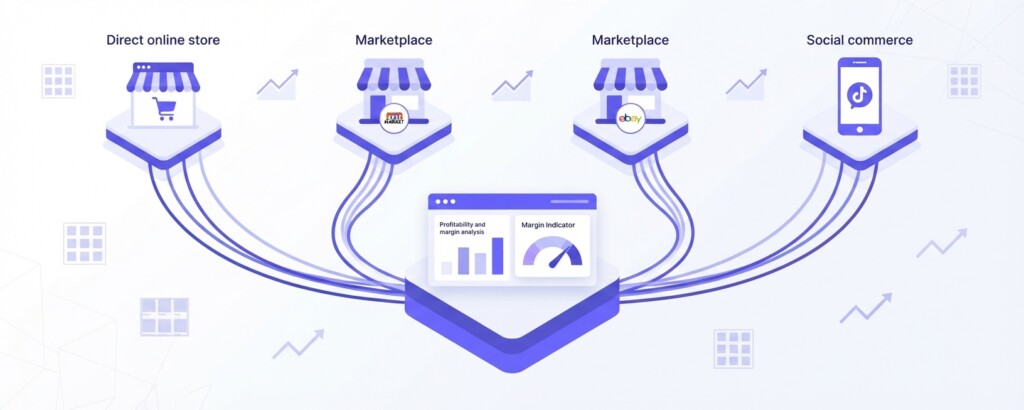
If you run across Shopify, Shopee, Lazada and TikTok Shop simultaneously, it is worth noting that each platform has a different search architecture and customer vocabulary. The language mismatch patterns you identify in Shopify’s Behaviour Reports often appear in different forms across marketplace platforms.
On Shopee and Lazada, product discovery is primarily driven by platform search algorithms and keyword indexing in your listing titles and attributes. On TikTok Shop, discovery happens through content keywords in video captions and hashtags rather than traditional catalogue search. The same underlying product naming problem manifests differently across each channel.
A useful workflow: take your top 20 zero-result search terms from Shopify’s Behaviour Reports and cross-reference them against the keyword data available inside Shopee Seller Centre and Lazada Seller Centre. If the same terminology gaps appear across channels, you have a systemic catalogue language problem rather than a channel-specific one. That changes the fix — it means updating your master product data rather than patching individual platforms.
If you are managing product data across Shopify and multiple marketplaces, centralising your product information and using consistent, customer-language-driven naming conventions saves significant ongoing optimisation effort. What you fix in one place should propagate to all channels.
Building a Monthly Search Audit Routine
Zero-result search terms are not a one-time problem to fix. Customer language evolves, new products are added without adequate tagging, and seasonal demand shifts create new terminology gaps. The Behaviour Report should be reviewed on a monthly cadence, not treated as a one-off project.
- Export the ‘Searches with no results’ CSV on the first working day of each month for the prior month.
- Filter for queries with more than 10 searches — these represent meaningful signal, not noise.
- Categorise each term: product exists with language gap, product gap, or typo.
- Prioritise by estimated gross profit recovery using your average margin and conversion rate.
- Assign fixes to your merchandising or content team with a two-week completion target.
- Review the same terms in the following month’s report to confirm they now return results.
- Track the before-and-after conversion rate for search users on a monthly basis as your impact metric.
When to Use a Third-Party Analytics Tool
Shopify’s native Behaviour Reports give you the raw query data you need for this analysis, but they do not connect search performance to margin, channel contribution, or blended profitability across your entire business. If you are running a multi-channel operation, the financial picture requires pulling data from Shopify, your marketplace seller centres, advertising platforms, and your cost base into a single view.
This is where a tool like BrizoMarket becomes genuinely useful — it centralises performance and profitability data across your channels so you can see not just which search queries are losing you revenue, but how that lost revenue connects to your overall contribution margin and channel-level profitability. That context changes how you prioritise fixes.
Key Takeaways and Next Steps
Zero-result searches are a revenue leak hiding in plain sight inside your Shopify analytics. The data is already available to you at no additional cost. The fixes are largely operational rather than technical, and the financial impact is straightforward to calculate and present.
Start with 90 days of data, focus first on products you already stock but customers cannot find, and prioritise fixes by gross margin contribution rather than raw search volume. Build this into a monthly routine rather than treating it as a one-time project, and cross-reference your findings across your marketplace channels to identify systemic catalogue language problems.
The stores that maintain the highest search conversion rates are not the ones with the most sophisticated technology — they are the ones that consistently listen to what customers are trying to tell them through their search behaviour, and act on it.
See Your Multi-Channel Profitability in One Place
BrizoMarket helps e-commerce operators connect performance data across Shopify and marketplace channels so you can make margin-aware decisions. If you want to understand how search performance, product mix and channel contribution connect to your overall profitability, we can help.